


DeepSeek - AI Assistant
3.87.10K Reviews
App Specs
- Version
- 2.6.1
- Updated On
- License
- Free
- Downloads
- 50,000,000+
- Developer
- DeepSeek
- Categories
- Productivity
- Platform
- Android, iOS
Screenshots
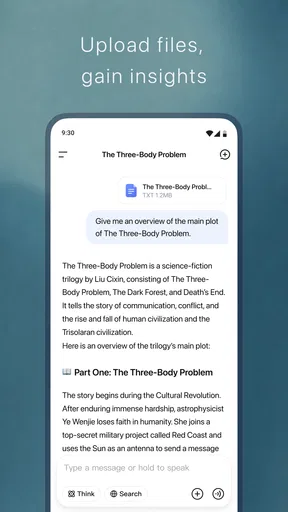
 Analysis by AppCompare
When I need to untangle a question, shape a rough idea, or get a first draft moving, I want an assistant that feels quick to consult rather than another system I have to manage. That’s the kind of role DeepSeek - AI Assistant can fill. I find it most useful when I treat it as a thinking partner for small, clearly framed jobs, not as an authority or a replacement for the apps that hold my calendar and tasks.
Quick prompts work best for quick answers
My speed expectations for an AI assistant are different from those for a calculator or notes app: a brief pause is acceptable if the reply saves me time overall. With DeepSeek, the practical test is whether I can ask a direct question, scan the answer, and decide what to do next without getting pulled into a long back-and-forth. Short prompts with a clear goal make that easier. Instead of asking it to “help with work,” I’d request a concise outline for a particular email or ask it to explain one unfamiliar term.
For everyday use, I’d start with tasks where a useful first pass matters more than a perfect final answer: turning a scattered thought into a list of talking points, comparing two approaches, or finding a simpler way to phrase a message. I still check facts and edit the wording before relying on it. That small review step is part of using any generative assistant well, and it prevents a fluent response from being mistaken for a verified one.
When a chat becomes a heavier work session
The experience changes when I move from one question to a longer task. A multi-part request may need follow-up prompts to narrow the answer, and it helps to keep each new instruction focused. If I’m planning a meeting, for example, I might first ask for an agenda structure, then add the audience and time available, and finally ask for a short version I can paste into my notes. Breaking the work into stages gives me more control than asking for a finished plan in one sprawling prompt.
That approach also makes it easier to catch a misunderstanding early. If the first answer misses the point, I can correct one assumption instead of rewriting a long request from scratch. I wouldn’t use the chat as my only record of an important project: copy anything I need to keep into a document or task manager I already trust. The assistant can help produce material, while a dedicated productivity app remains the better place to track ownership, deadlines, and completion.
Reliability means checking the answer, not just the app
There are two kinds of reliability to consider here. One is whether the app behaves consistently on a particular device and connection; the other is whether a response is accurate and appropriate for the decision at hand. I avoid treating a confident tone as proof. For research, health, money, legal matters, or anything with real consequences, I use DeepSeek to clarify questions or organize what I need to verify, then consult dependable sources or a qualified person.
Conversation is useful when context matters, but it can also make a wrong assumption travel further into later replies. If the direction starts drifting, I find it sensible to restate the goal in plain language or begin a clean exchange rather than trying to patch every earlier detail. That is a practical reset, not a sign that the tool has failed; it keeps the task small enough for me to judge the result.
Worth Reading Before You Choose

EA SPORTS FC Mobile 26 Is a Bigger Football Game, but It Takes Time

Flipboard Shows What News Apps Must Do Beyond the Feed

Switching to Android Auto Means Rethinking Your Driving Routine

Google Calendar Makes a Crowded Week Easier to Manage

Ludo King Makes the Most of the Minutes Between Plans

Baby Panda World Brings Quick Play to Modern Phones, but Its Game Library Feels Busy
Device fit and daily habits
DeepSeek is a free productivity app from DeepSeek, and its current version is 2.1.2. It runs on Android 6.0 or later, which gives people with older supported devices a way to try it without needing the newest operating system. The app is rated Teen. I’d still think about where and how I use an AI chat, particularly if I’m working with personal or confidential details: share only what is necessary for the task, and avoid pasting information you would not want handled by an online service.
I also wouldn’t judge resource use from a single short session. Longer exchanges, frequent use, network conditions, and the phone itself can all affect how responsive an app feels. If the device is already busy, I’d close work I don’t need and try a concise prompt before assuming the assistant itself is the source of a slowdown. For battery-sensitive situations, such as a long commute without a charger, I’d keep the session focused and save any useful output rather than leaving an extended conversation open.
Who benefits most—and who may prefer something else
I’d recommend trying DeepSeek if you often need help getting started: a blank page becomes an outline, a dense idea becomes a plain-language explanation, or a list of options becomes easier to compare. Students can use it to generate study questions from a topic they already understand, then check the answers against their course material. Someone preparing for a conversation can ask for neutral talking points and revise them to sound like themselves. In each case, the useful part is the first draft or fresh angle, not handing over the final judgment.
If your main need is dependable reminders, shared calendars, recurring task management, or a structured team workflow, a conventional organizer is likely the better primary tool. Those apps are designed to store and surface commitments, whereas an AI conversation is better for drafting, explaining, and exploring. I see the two as complementary: let DeepSeek help think through a task, then put the actual deadline or action in the system you already use to stay accountable.
A realistic example is planning a busy weekday after a schedule change. I might describe the fixed commitments, ask for a few possible ways to group the remaining errands, and then choose the plan that fits my real travel time. I would not assume the assistant knows current opening hours or the details of my calendar unless I provide them and verify the result. That boundary keeps the suggestion useful without letting a plausible schedule become a source of missed appointments.
What to know before making it a habit
DeepSeek has a 4.1 average from around 296,000 ratings, and it has been installed over 50 million times. Those figures suggest that many people have tried it, but they don’t tell me whether it suits a particular person’s habits. I’d judge it through a few ordinary tasks: ask for an explanation, request a short rewrite, and see whether the answers are easy to steer and worth checking. A good fit is less about how often I open it and more about whether it reliably helps me move from uncertainty to a useful next step.
One tip is to include the format you need in the prompt: ask for three brief options, a checklist, or a plain-language summary rather than hoping the response lands at the right length. Another is to give relevant constraints up front, such as who will read a message or what tone you want, while leaving out private details that are not needed. These small choices can reduce editing and make a conversation more purposeful without turning prompt-writing into a project of its own.
DeepSeek was released on January 8, 2025, and its broad appeal is easy to understand: it offers an accessible way to bring conversational AI into everyday productivity. Still, I would skip it if I need answers that are automatically authoritative, offline certainty, or a full task-management system. For those jobs, a trusted reference, professional advice, or a dedicated organizer is a better match. Used with sensible checks, though, it can be a handy companion for drafting, learning, and thinking through the next step.
Getting Started with DeepSeek
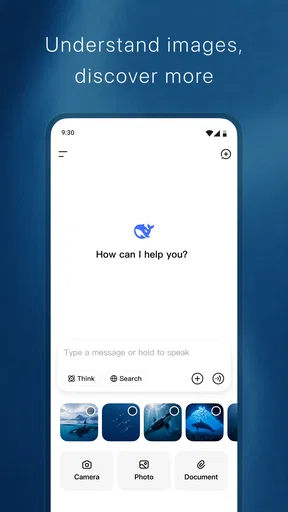
Once you download and fire up DeepSeek - AI Assistant, you're greeted with a sleek, no-nonsense interface. The setup process is pretty straightforward, guiding you through a few quick steps to personalize your experience. Before you know it, you’re ready to dive into a world where AI meets usability.
Features That Stand Out
What really caught my attention was the app’s ability to integrate seamlessly with my daily routines. Whether it’s setting reminders, managing tasks, or even answering trivia questions, DeepSeek does it all with a touch of humor and a lot of efficiency.
One of my favorite features is the voice command functionality. You can chat with DeepSeek as if you’re talking to a friend. It understands context and can even remember past interactions to provide a more personalized experience. It’s like the app gets to know you over time, which feels pretty magical.
Performance and Reliability
I’ve been using DeepSeek for a while now, and I’m impressed with its performance. The app runs smoothly without any hiccups, even when multitasking. It’s fast, responsive, and doesn’t drain my phone's battery like some other assistant apps tend to do.
The developers have done a fantastic job ensuring that DeepSeek is reliable. I haven’t experienced any crashes or bugs, which is a huge plus when you’re relying on an app to assist you with daily tasks.
Why You’ll Love It
What makes DeepSeek a standout app is its user-friendliness and versatility. Whether you’re a busy professional needing to stay organized or just someone who loves experimenting with new tech, you’ll find something to love in this app.
DeepSeek also shines in its ability to adapt to different accents and dialects. No more yelling at your phone to get it to understand you! It’s a small detail, but it makes a huge difference in the overall user experience.
Potential Areas for Improvement
While I’m thoroughly enjoying DeepSeek, there are a couple of areas that could use some fine-tuning. The app’s learning curve can be a bit steep for those who aren’t tech-savvy. A few more in-app tutorials or tips could go a long way in making the app even more accessible to everyone.
Additionally, it would be great to see more integration with third-party apps. The current options are solid, but expanding this would truly elevate DeepSeek’s functionality.
Final Thoughts
Overall, DeepSeek - AI Assistant is a refreshing take on what a personal assistant app can be. It’s smart, intuitive, and genuinely helpful in managing day-to-day tasks. If you’re on the lookout for a digital assistant that feels personal and responsive, DeepSeek is definitely worth checking out.
With its continuous updates and a strong foundation, I’m excited to see how DeepSeek evolves. Give it a whirl, and you just might find it becoming your go-to app for all things organized and efficient!
Pros
- Intuitive user interface enhances usability.
- Offers a wide range of helpful features.
- Quick response time for queries.
- Integrates seamlessly with other apps.
- Regular updates improve functionality.
Cons
- Occasional issues with voice recognition.
- Limited customization of settings.
- Requires stable internet connection.
- Some features behind a paywall.
- Can be resource-intensive on older devices.
FAQs for DeepSeek - AI Assistant
What is DeepSeek - AI Assistant and what can it do?
DeepSeek - AI Assistant is an advanced AI-powered application designed to assist users with a wide range of tasks. It can perform functions like scheduling, answering questions, providing recommendations, and automating routine tasks. Its AI capabilities allow it to learn and adapt to user preferences over time, enhancing its efficiency and usefulness.
Is DeepSeek - AI Assistant compatible with all devices?
DeepSeek - AI Assistant is available for both Android and iOS devices, ensuring broad compatibility. However, it's important to check the specific system requirements for your device to ensure optimal performance. Regular updates may also be necessary to maintain compatibility with newer OS versions.
How does DeepSeek - AI Assistant ensure user privacy and data security?
DeepSeek - AI Assistant is committed to protecting user privacy and data security. It employs robust encryption methods to safeguard user data and follows strict privacy policies. Users can review and manage their data preferences within the app, ensuring transparency and control over personal information.
Does DeepSeek - AI Assistant require an internet connection to function?
While DeepSeek - AI Assistant can perform some local tasks offline, most of its advanced features require an internet connection. This is necessary for accessing cloud-based AI services, real-time updates, and syncing data across devices. Users should ensure a stable connection to utilize the app's full capabilities.
Are there any subscription fees or in-app purchases in DeepSeek - AI Assistant?
DeepSeek - AI Assistant offers a basic version for free, but there may be subscription options or in-app purchases available for advanced features. These can include enhanced AI functions, personalized settings, or additional support services. Users should review the pricing details within the app to make informed decisions.


